
7 Ergonomic Office Essentials Reviewed: Our Honest Picks for Comfort and Productivity
Discover 7 ergonomic office essentials that transform your workspace. From standing desks to smart notebooks, find the right tools for comfort and productivity with honest reviews and buying guidance.
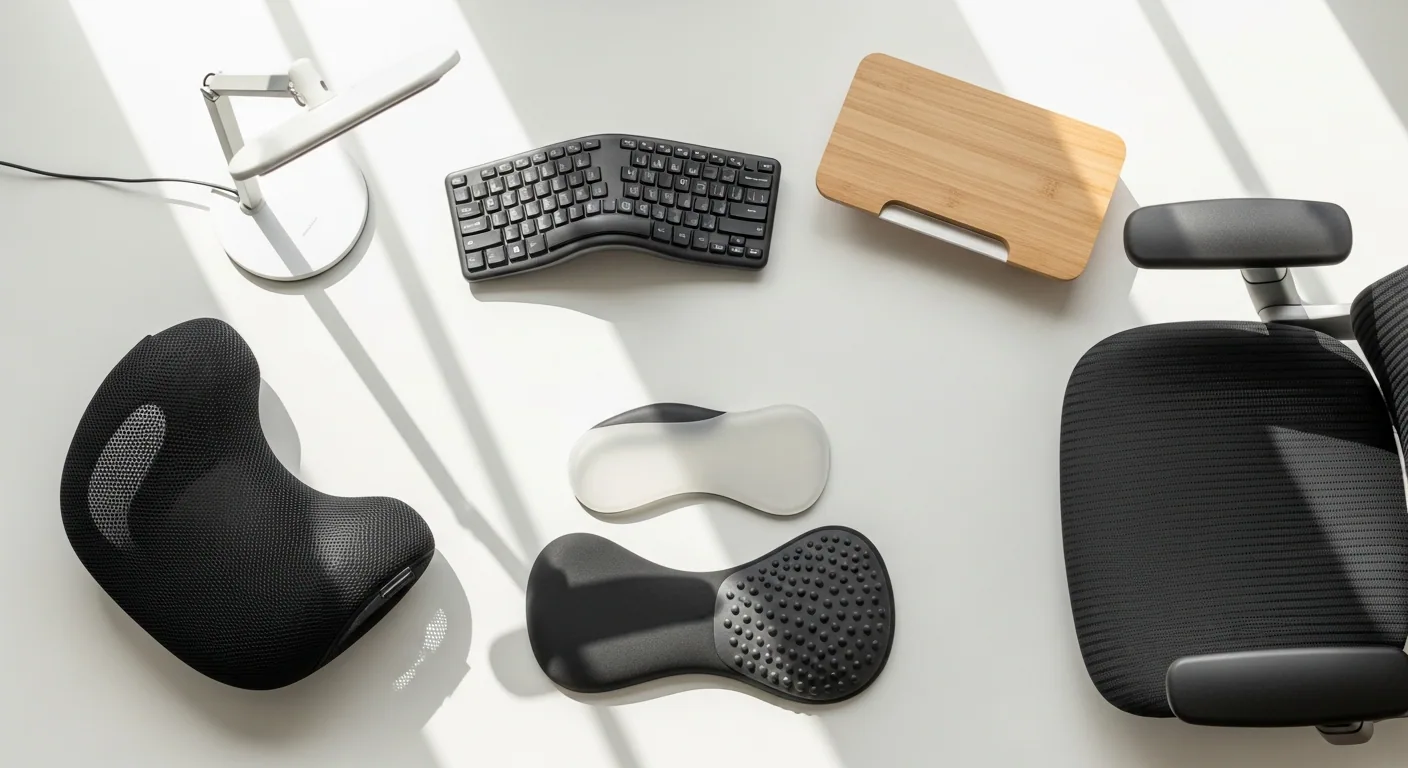
You've been sitting at your desk for three hours straight. Your lower back aches. Your wrists are screaming. Your neck feels like it's made of concrete. Sound familiar? Most people don't realize that their office setup is actively working against them—and the ripple effects show up in productivity, mood, and long-term health. The right ergonomic essentials aren't luxuries; they're investments in how you actually function.
What separates genuinely good ergonomic products from the mediocre stuff is thoughtfulness. Real ergonomic design isn't about adding more padding or claiming something "supports" your back. It's about matching your body's actual needs, adapting to how you move, and honestly solving problems instead of just looking the part. The best products disappear into your workflow and make you forget you're even thinking about posture.
Here's what we're covering: a comprehensive breakdown of seven ergonomic office essentials that actually deliver, including chairs, standing desk converters, input devices, smart notebooks, and organizational tools.
1. Herman Miller Sayl Chair
This chair is beautiful in the way that makes sense—it's not designed to look fancy; it's designed to work. The Y-shaped structure isn't aesthetic flourish; it's functional genius borrowed from suspension bridge engineering. The unframed 3D back moves with your spine instead of forcing you into a predetermined shape, which means whether you're upright, reclined, or somewhere in between, you're actually supported.
The breathable elastomer back prevents that sweaty-back-syndrome that destroys your focus around 2 p.m. And here's the thing: this chair doesn't demand PhD-level adjustment. You get seat height, arm height, and a harmonic tilt mechanism that feels intuitive. It's fully customizable in colors and finishes, so it doesn't look like every other task chair on the market. The compact footprint actually matters if you're working in anything smaller than a warehouse office. At $600–$900, it sits in that sweet spot where you're getting genuine premium ergonomics without dropping four figures on a Herman Miller Aeron.
The trade-offs are minimal but real. It's not as adjustable as full-load premium chairs (no lumbar depth adjustment, for instance), and if you're extremely tall or heavy, you might need specific configurations. Some people just don't vibe with the distinctive look either, which is fair—you can't please everyone's aesthetic.
Best for: Design-conscious professionals who need real ergonomic support without the corporate-chair look, particularly those in smaller spaces.
2. VariDesk Pro Plus 36 Standing Desk Converter
Movement changes everything. Sitting all day is objectively bad for you—your circulation gets sluggish, your legs go numb, and your posture collapses like a house of cards. A standing desk converter is the practical response: it takes your existing desk and turns it into a sit-stand station without the $1,500+ price tag of a full electric desk.
The VariDesk Pro Plus 36 arrives fully assembled, which matters more than it sounds—you unbox it, plop it on your desk, and you're done. Its two-tier design keeps your monitors elevated while your keyboard and mouse sit lower, maintaining proper arm positioning at both sitting and standing heights. The 11 height settings cover essentially everyone, and the spring-assisted lifting mechanism is where the real genius lives. It's smooth, effortless, and stable—even with dual monitors and a laptop on top, there's zero wobble at maximum height. That stability is crucial; a wobbly desk converter will destroy your willingness to actually use it.
The weight (over 50 lbs) becomes a consideration once it's in place because you're not moving it again without effort. It also takes up real estate on your desk—when you're in sitting mode, your available surface shrinks noticeably. And yes, it's manual adjustment, not motorized, so if you're switching positions constantly, you'll feel that. But honestly? For the price and build quality, these are acceptable compromises.
Best for: Anyone with an existing desk they like who wants to add movement without major expense or renovation, especially those in smaller offices.
3. Brother P-Touch Cube Plus (PT-P710BT) Label Maker
This might seem like an odd inclusion in an ergonomic lineup, but organization is ergonomic. Disorder creates stress, stress creates tension, and tension creates pain. The Brother P-Touch Cube Plus is genuinely the best way to create a labeled, organized workspace that doesn't drive you crazy.
The Bluetooth connection changes everything here. Instead of fiddling with tiny buttons on the device itself, you design labels on your phone using the Design&Print app—hundreds of fonts, frames, symbols, templates, the works. The TZe laminated tapes are legitimately durable; they handle water, fading, abrasion, and temperature swings, so your labels don't become illegible garbage in three months. Support for tape widths up to 24mm means you're not limited to tiny labels; you can do file folders, storage bins, cable organizers, whatever.
The high-resolution print head produces crisp output, and the rechargeable battery means you can label things at your filing cabinet without being tethered to a power outlet. This is a genuinely useful tool, not a gimmick. The cons exist: tape cassettes cost more than generic alternatives, it's not designed for high-volume shipping label work, and it relies on your smartphone app to unlock its full potential. But for workspace organization? This is it.
Best for: Anyone building an organized, labeled workspace—this includes home office enthusiasts, small business owners, and people who take their filing systems seriously.
4. Boox Note Air5 C Smart Notebook
The Boox Note Air5 C sits at the intersection of technology and nostalgia—it's a 10.3-inch tablet with an E Ink color display that makes writing, sketching, and reading genuinely feel like paper. This isn't a compromise device; it's a different category entirely. The 300 PPI black-and-white and 150 PPI color resolution mean text is crisp and diagrams are actually visible, not blurry nonsense.
The Wacom EMR stylus responds precisely to your input with minimal lag, and the writing feel genuinely approximates pen on paper—no awkward digital stiffness. The front light with color temperature adjustment means you're not destroying your eyes in dim conditions. It runs Android 12, so you have access to Google Play Store apps, which opens up possibilities beyond note-taking: e-reading, document annotation, PDF markup, even some productivity tools. The 6GB RAM and 64GB storage handle your notes and library without stuttering.
This is ideal for students, researchers, and creatives who actually prefer handwriting to typing but want the organizational benefits of digital. The trade-off is price ($500–$600) and the fact that color E Ink refresh rates are slower than traditional tablets. Battery life is good for e-ink but shorter than monochrome devices because of the color layer and Android running underneath. It's also still somewhat niche, so accessory availability and third-party software support lag behind mainstream tablets. But if your workflow genuinely involves handwriting and annotation, this eliminates the friction between paper and digital.
Best for: Students, academics, creatives, and researchers who handwrite extensively and need digital organization without the distraction of a full tablet.
5. Simple Houseware Mesh Desk Organizer
Clutter is friction. Every stray pen, every loose paper, every "I'll organize this later" pile is your brain processing unnecessary information. A good desk organizer isn't storage—it's the foundation of focus.
The Simple Houseware Mesh Desk Organizer is the gold standard for a reason. The multi-section design includes vertical slots for papers and folders, a sliding drawer for concealed storage, and side compartments for pens, scissors, and small essentials. Steel mesh construction means it's genuinely sturdy—no tipping when fully loaded, no buckling under weight. The mesh design is the smart move: you can see what's inside without pulling everything out. It's not huge, so it doesn't consume your entire desk surface. The minimalist aesthetic doesn't clash with any office decor. At $20–$35, it's arguably the highest ROI product on this list. Tens of thousands of positive reviews exist because this product actually works.
The aesthetic trade-off is real if you prefer solid, enclosed storage. Items occasionally fall through mesh gaps if they're extremely small, and customization options are limited—mostly black or silver. These are minor concerns. The bigger point: this organizer actually reduces clutter, and that has ripple effects on your entire work experience.
Best for: Anyone with a cluttered desk who wants immediate, affordable improvement with zero learning curve.
6. Logitech MX Master 3S Wireless Mouse
A mouse is tactile. You grip it hundreds of times daily. If it's wrong for your hand, it accumulates strain in ways you don't consciously notice until your wrist becomes a problem. The Logitech MX Master 3S is the premium answer to the question: what does a mouse engineered for actual comfort look like?
The ergonomic sculpting isn't marketing—it's genuinely refined over multiple generations. The hand position naturally aligns with your wrist angle, reducing pronation strain. The 8K DPI optical sensor tracks on any surface, including glass, with zero calibration needed. MagSpeed electromagnetic scrolling is where this mouse transcends utility and becomes a tool that actually improves your speed: it scrolls 1,000 lines per second, but it's also smart enough to switch to precision line-by-line scrolling when you need it. Seven customizable buttons—including a unique side thumb wheel for horizontal scrolling—allow you to reprogram everything for your specific workflow.
The quiet clicks (90% quieter than the previous generation) matter if you work around other people. Multi-device connectivity via Logi Bolt USB receiver or Bluetooth lets you pair up to three devices and switch seamlessly. Flow technology means you can copy, paste, and move files between connected computers without thinking about it. USB-C quick charging gives you a full day from one minute of charge, and a full charge lasts 70 days. This is a mouse that disappears into your workflow because everything is optimized for efficiency.
The cost ($90–$120) is genuinely high for a mouse, and if you have small hands, the ergonomic design might be slightly oversized. It's right-handed only, which excludes left-handed users entirely. Full customization requires Logitech Options+ software installation. But for power users, creatives, and anyone working across multiple devices, this is the most refined input device available.
Best for: Power users, creatives, and professionals who work with multiple computers and want a mouse that actively improves their workflow efficiency.
7. HP 960 Ergonomic Wireless Keyboard
Your wrists are small bones and tendons, not meant to be torqued at 45-degree angles while you type. The HP 960 responds to this reality with a split, contoured design that lets your wrists stay neutral—not bent, not twisted, just natural.
The separate number pad isn't just a design choice; it fundamentally changes your desk geometry. You can position your mouse closer to the main keyboard, reducing the reach and awkward angle that causes shoulder and neck strain. The quiet, tactile keys feel good to press without adding noise to a shared environment. The integrated palm rest provides actual wrist support, preventing the sustained tension that builds into pain over months. The wireless connection eliminates cable clutter and gives you freedom in desk arrangement. Programmable keys let you customize shortcuts for your specific workflow, which adds productivity on top of the ergonomic benefits.
The split design requires an adjustment period—your muscle memory expects traditional alignment, so the first week or two might feel slightly odd. The separate number pad means managing two devices (which might require separate charging if you go cordless). It takes more desk space than a standard keyboard. And at $100–$150, it's not impulse-purchase territory. But the ergonomic improvement is measurable. People who switch from flat, straight keyboards to split ergonomic keyboards consistently report reduced wrist strain and better posture. The cost is justified by the health benefit alone.
Best for: Heavy typists, remote workers, and anyone experiencing wrist or neck strain who's willing to adjust their muscle memory for long-term comfort.
How to Choose the Right Ergonomic Office Essentials
Assess Your Pain Points First
Don't buy ergonomic gear because it's trendy or because someone recommended it. Sit at your desk right now and notice what actually hurts. Is it your lower back? Your neck? Your wrists? Your shoulders? Your specific pain point determines your purchase priority. If your back is the problem, a chair comes before a keyboard. If you're getting carpal tunnel warnings, input devices come first. If your desk is cluttered and chaotic, organization comes before anything else. Ergonomics is about solving your actual problems, not theoretical problems.
Consider Your Workspace Constraints
Ergonomic solutions must fit your actual environment. If you're working in a 6x8-foot room, a huge standing desk converter might be impractical. If you're in a corporate office with noise restrictions, a clicky keyboard is a non-starter. If you're traveling between multiple locations, a stationary monitor stand doesn't help. Measure your desk, understand your noise environment, assess your mobility needs, and only buy products that align with those constraints. A perfect ergonomic chair in an impossibly cramped space is useless.
Test Before You Buy (Or Know the Return Policy)
Ergonomics is personal. What works for someone else's body might not work for yours. Some chairs feel amazing in a showroom but create back problems within a week. Some keyboards feel great initially but cause wrist issues after months. If you're investing more than $100 in an ergonomic product, prioritize retailers with actual return policies—not 15 days, but 30–60 days so you can genuinely test it under real working conditions. If you're buying online and can't test, look for products from established manufacturers with strong reputations and abundant real-world reviews from people describing specific problems.
Build a System, Not an Impulse Collection
Ergonomic benefits compound. A good chair plus a terrible keyboard doesn't equal ergonomic success—it equals partial improvement. When planning your setup, consider the whole system: chair, desk height, monitor position, keyboard and mouse, lighting, and organization. If you're making multiple purchases, sequence them strategically. Start with the pain point that bothers you most. Then add complementary pieces. A standing desk converter only helps if your monitor and keyboard heights are also correct. A great keyboard only helps if your chair and desk support proper arm positioning.
Building Your Complete Ergonomic System: Start with Your Pain Point
If your lower back is the issue, the Herman Miller Sayl Chair ($600–$900) is the single best investment—it adapts to your spine, prevents slouching, and the breathable back actually matters for all-day comfort. Pair it with the Simple Houseware Mesh Desk Organizer ($20–$35) to eliminate desk chaos, which alone reduces postural stress.
If your wrists and forearms are suffering, the HP 960 Ergonomic Wireless Keyboard ($100–$150) plus the Logitech MX Master 3S Mouse ($90–$120) directly address the problem. These two devices ensure your hands, wrists, and forearms stay neutral throughout the day. Add the chair afterward once the immediate pain subsides.
If you're stuck in a sitting-all-day rut, the VariDesk Pro Plus 36 Standing Desk Converter ($300–$450) forces movement into your day without requiring a desk replacement. This is the most immediate health intervention you can make—the act of standing restructures your entire spine alignment.
Start with your worst problem, solve it completely, then add the next piece. Your ergonomic system will compound over time, and you'll notice the difference in your work quality, energy levels, and how your body actually feels.
Related posts

5 Baby Products Reviewed: Our Honest Picks for 2026
10 Kitchen Organization Solutions Reviewed: Our Honest Picks for Every Budget

Sports Research Collagen Peptides Review: Is This Hydrolyzed Collagen Powder Worth It?